Tag Archives: cybersecurity

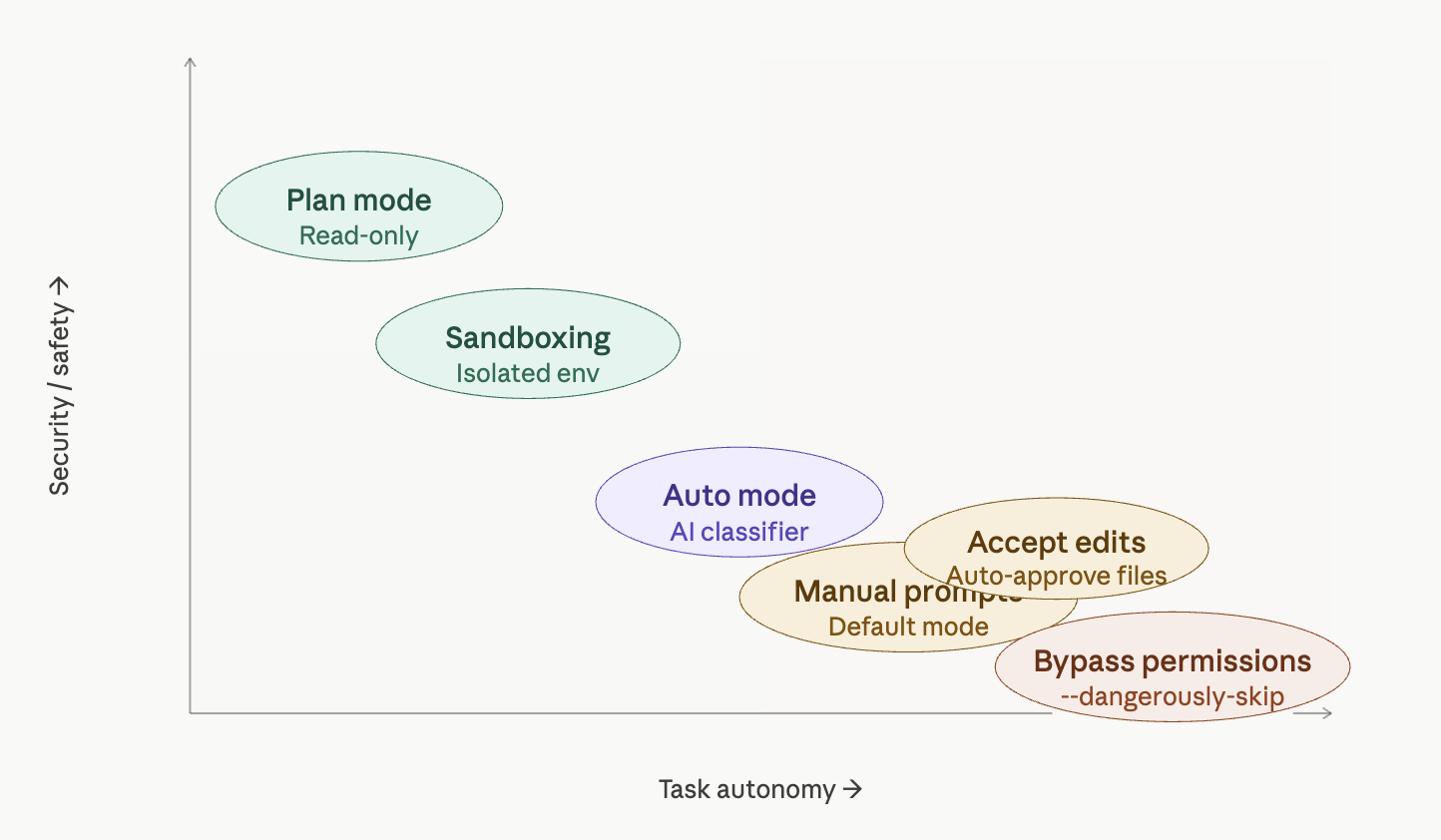
Claude Code Security: When Guardrails Become “Vibes”

There’s a growing pattern in modern AI developer tools: impressive capabilities wrapped in security models that look robust—but are, in reality, built on ad-hoc logic and optimistic assumptions.

Related video:

Claude Code is a great case study of this.

At first glance, it checks all the boxes:

  • Sandboxing
  • Deny lists
  • User-configurable restrictions

But once you look closer, the model starts to feel less like a hardened security system… and more like a collection of vibecoded guardrails—rules that work most of the time, until they don’t.


The Illusion of Safety

The idea behind Claude Code’s security is simple: prevent dangerous actions (like destructive shell commands) through deny rules and sandboxing.

But this approach has a fundamental weakness: it relies heavily on how the system is used, not just on what is allowed.

In practice, this leads to fragile assumptions such as:

  • “Users won’t chain too many commands”
  • “Dangerous patterns will be caught early”
  • “Performance optimizations won’t affect enforcement”

These assumptions are not guarantees. They are hopes.

And security built on hope is not security.


Vibecoded Guardrails

“Vibecoded” guardrails are what you get when protections are implemented as:

  • Heuristics instead of invariants
  • Conditional checks instead of enforced boundaries
  • Best-effort filters instead of hard constraints

They emerge naturally when teams prioritize:

  • Speed of development
  • Lower compute costs
  • Smooth UX

But the tradeoff is subtle and dangerous: security becomes probabilistic.

Instead of “this action is impossible,” you get:

“this action is unlikely… under normal usage.”

That’s not a guarantee an attacker respects.


Trusting the User (Even When They’re Tired)

One of the most overlooked aspects of tool security is the human factor.

Claude Code’s model implicitly assumes:

  • The user is paying attention
  • The user understands the risks
  • The user won’t accidentally bypass safeguards

But real-world developers:

  • Work late
  • Copy-paste commands
  • Chain multiple operations
  • Automate repetitive tasks

In other words, they behave in ways that systematically stress and bypass fragile guardrails.

A secure system should protect users especially when they are tired, not depend on them being careful.


When Performance Breaks Security

A recurring theme in modern AI tooling is the cost of security.

Every validation, every rule check, every sandbox boundary:

  • Consumes compute
  • Adds latency
  • Impacts UX

So what happens?

Optimizations are introduced:

  • “Stop checking after N operations”
  • “Skip deeper validation for performance”
  • “Assume earlier checks are sufficient”

These shortcuts are understandable—but they create gaps.

And attackers (or even just unlucky workflows) will find those gaps.


The Bigger Pattern in AI Tools

This isn’t just about Claude Code. It reflects a broader industry trend:

1. Security as a UX Layer

Instead of being enforced at a system level, protections are implemented as user-facing features.

2. Optimistic Threat Models

Systems are designed for “normal usage,” not adversarial scenarios.

3. Cost-Driven Tradeoffs

Security is quietly weakened to reduce token usage, latency, or infrastructure cost.


So What Should We Expect Instead?

If AI coding agents are going to run code on our machines, security needs to move from vibes to guarantees.

That means:

  • Deterministic enforcement (rules that cannot be bypassed)
  • Strong isolation (real sandboxing, not conditional checks)
  • Adversarial thinking (assume misuse, not ideal usage)

Anything less is not a security model—it’s a best-effort filter.


Final Thoughts

Claude Code highlights an uncomfortable truth:

Many AI tools today are secured just enough to feel safe—but not enough to actually be safe under pressure.

As developers, we should treat these tools accordingly:

  • Don’t blindly trust guardrails
  • Assume edge cases exist
  • Be cautious with automation and chaining

Because when security depends on “this probably won’t happen”…
it eventually will.


Further Reading


If you’re building or using AI agents, it’s worth asking a simple question:

Are the guardrails real… or just vibes?

🚨 Supply Chain Attacks: The Hidden Risk in Your Dependencies

Recently, a widely used library — Axios — was compromised.

For a short window, running npm install could pull malicious code designed to steal credentials. Incidents like this have even been linked to state-sponsored groups, including North Korea.

That’s a supply chain attack.

Related YT video:


🧠 What is a Supply Chain Attack?

A supply chain attack is when attackers don’t hack you directly…

They compromise something you trust.

  • A dependency
  • A library
  • A tool in your pipeline

Instead of breaking your code, they poison your dependencies.

And because modern apps rely on hundreds of packages…
this scales extremely well.


🔥 Why This Works

We trust dependencies too much.

  • We install updates blindly
  • We use “latest” versions
  • We assume registries are safe

But in reality:

Installing a dependency = executing someone else’s code


🛡️ How to Protect Yourself

Let’s go straight to what actually works.


📌 1. Version Pinning

Don’t use floating versions.

Bad:

pip install requests
npm install lodash

Good:

requests==2.31.0
lodash@4.17.21

This ensures you always install the exact same version.


🔒 2. Lockfiles + Hash Pinning

A lockfile records the exact versions of all your dependencies — including indirect ones.

Examples:

  • package-lock.json
  • poetry.lock
  • uv.lock

Think of it as a snapshot of your dependency tree.

Instead of:

“install lodash”

You’re saying:

“install this exact version, plus all its exact dependencies”


🔐 Hash Pinning

Some lockfiles also include cryptographic hashes.

This means:

  • The version must match ✅
  • The actual file must match ✅

If something is tampered with → install fails.

Lockfiles = reproducibility
Hashes = integrity


⏳ 3. Avoid Fresh Versions

A simple but powerful rule:

👉 Don’t install newly published versions immediately

Why?

  • Malicious releases are often caught quickly
  • Early adopters take the risk

Waiting even a few days can make a big difference.


🔍 4. Continuous Scanning with SonarQube

Use tools like SonarQube to analyze your codebase.

They help detect:

  • Vulnerable dependencies
  • Security issues
  • Risky patterns

But remember: they won’t catch everything.


🧱 5. Reduce Dependencies

The fewer dependencies you have…

…the fewer things can betray you.


🧠 Mental Model

Dependencies are not just libraries.

They are:

Remote code execution with a nice API


🚀 Final Thoughts

Supply chain attacks are growing because they scale:

  • Attack one package
  • Impact thousands of developers

To reduce your risk:

  • Pin versions
  • Use lockfiles + hashes
  • Don’t blindly trust “latest”
  • Be cautious with fresh releases

🔗 References

Exploring Steganography with Hidden Unicode Characters

In the digital age, where information security is paramount, steganography has emerged as a fascinating and subtle method for concealing information. Unlike traditional encryption, which transforms data into a seemingly random string, steganography hides information in plain sight. One intriguing technique is the use of hidden Unicode characters in plain text, an approach that combines simplicity with stealth.

Related video from my Youtube channel:

What is Steganography?

Steganography, derived from the Greek words “steganos” (hidden) and “graphein” (to write), is the practice of concealing messages or information within other non-suspicious messages or media. The goal is not to make the hidden information undecipherable but to ensure that it goes unnoticed. Historically, this could mean writing a message in invisible ink between the lines of an innocent letter. In the digital realm, it can involve embedding data in images, audio files, or text.

The Role of Unicode in Text Steganography

Unicode is a universal character encoding standard that allows for text representation from various writing systems. It includes many characters, including letters, numbers, symbols, and control characters. Some of these characters are non-printing or invisible, making them perfect for hiding information within plain text without altering its visible appearance.

How Does Unicode Steganography Work?

Unicode steganography leverages the non-printing characters within the Unicode standard to embed hidden messages in plain text. These characters can be inserted into the text without affecting its readability or format. Here’s a simple breakdown of the process:

  1. Choose Hidden Characters: Unicode offers several invisible characters, such as the zero-width space (U+200B), zero-width non-joiner (U+200C), and zero-width joiner (U+200D). These characters do not render visibly in the text.
  2. Encode the Message: Convert the hidden message into a binary or encoded format. Each bit or group of bits can be represented by a unique combination of invisible characters.
  3. Embed the Message: Insert the invisible characters into the plain text at predetermined positions or intervals, embedding the hidden message within the regular text.
  4. Extract the Message: A recipient who knows the encoding scheme can extract the invisible characters from the text and decode the hidden message.

Example: Hiding a Message

Let’s say we want to hide the message “Hi” within the text “Hello World”. First, we convert “Hi” into binary (using ASCII values):

  • H = 72 = 01001000
  • i = 105 = 01101001

Next, we map these binary values to invisible characters. For simplicity, let’s use the zero-width space (U+200B) for ‘0’ and zero-width non-joiner (U+200C) for ‘1’. The binary for “Hi” becomes a sequence of these characters:

  • H: 01001000 → U+200B U+200C U+200B U+200B U+200C U+200B U+200B U+200B
  • i: 01101001 → U+200B U+200C U+200C U+200B U+200C U+200B U+200B U+200C

We then embed this sequence in the text “Hello World”:

H\u200B\u200C\u200B\u200B\u200C\u200B\u200B\u200B e\u200B\u200C\u200C\u200B\u200C\u200B\u200B\u200C llo World

To the naked eye, “Hello World” appears unchanged, but the hidden message “Hi” is embedded within.

Advantages and Disadvantages

Advantages:

  • Subtlety: The hidden information is invisible to the casual observer.
  • Preserves Original Format: The visible text remains unaltered, maintaining readability and meaning.
  • Easy to Implement: Inserting and extracting hidden characters is straightforward with proper tools.

Disadvantages:

  • Limited Capacity: The amount of data that can be hidden is relatively small.
  • Vulnerability: If the presence of hidden characters is suspected, they can be detected and removed.
  • Dependence on Format: Changes in text formatting or encoding can corrupt the hidden message.

Practical Applications

  1. Secure Communication: Concealing sensitive messages within seemingly innocuous text.
  2. Watermarking: Embedding copyright information in digital documents.
  3. Data Integrity: Adding hidden markers to verify the authenticity of text.

Conclusion

Unicode steganography in plain text with hidden characters offers a clever and discreet way to conceal information. By understanding and utilizing the invisible aspects of Unicode, individuals can enhance their data security practices, ensuring their messages remain hidden in plain sight. As with all security techniques, it’s essential to stay informed about potential vulnerabilities and to use these methods responsibly.