Tag Archives: artificial-intelligence

Claude Code permissions explained (Simply)

Related YouTube video:

Claude Code Permission Modes Explained: Stop Clicking “Yes” to Everything

If you’ve been using Claude Code for a while, you’ve probably experienced it: that moment when the 20th permission prompt appears and your finger just reflexively hits Enter. You’re not reading it anymore. You’re just approving.

This is prompt fatigue — and it’s a real security problem.

According to Anthropic’s own internal data, users approve 93% of permission prompts without making any changes. That’s not thoughtful oversight. That’s a person on autopilot, potentially approving harmful actions without realizing it.

So let’s actually understand the permission modes available in Claude Code, what they trade off, and which one you should probably be using.


The problem with the default mode

Claude Code’s default behavior is to prompt you before every potentially dangerous operation: bash commands, network requests, file writes. The intention is good — keep the human in the loop. But the implementation creates a paradox. The more it asks, the less you pay attention. The more you stop paying attention, the more dangerous it actually becomes.

Manually approving 93% of prompts without reading them is arguably worse than a well-designed automated system, because it gives you the illusion of control without any of the substance.


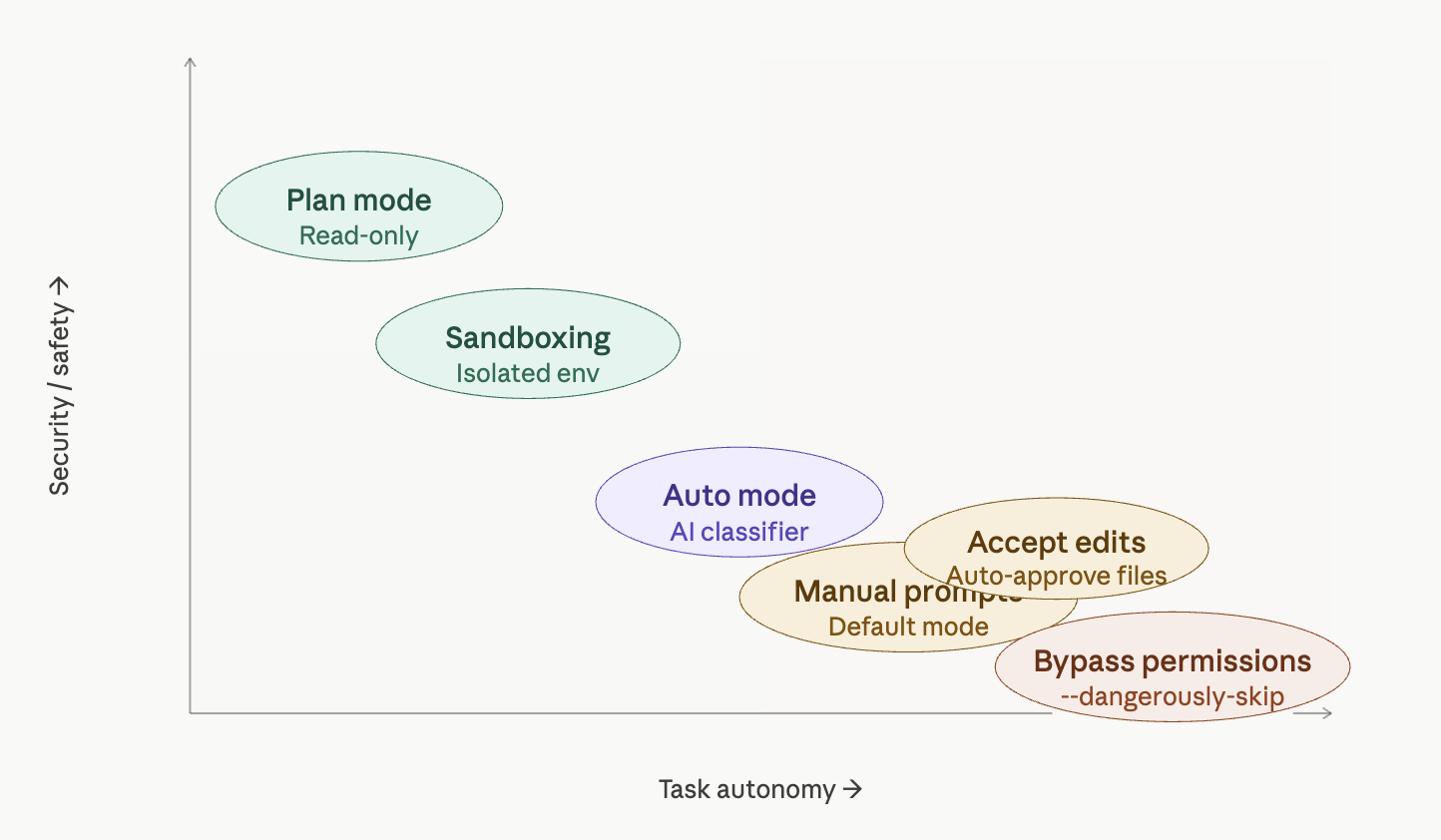
The five permission modes

Plan mode is arguably the best default for starting any session. Activated with Shift+Tab, this is a read-only mode — Claude can analyze your codebase, propose solutions, and reason through complex tasks, but it cannot modify anything. No files changed, no commands run. It’s perfect for exploration, architectural planning, or getting a second opinion on a tricky problem before taking action.

Accept edits is a middle-ground mode where file modifications are auto-approved, but bash commands still trigger a prompt. If your trust concern is primarily around shell execution rather than code changes, this might be a reasonable balance — though the bash prompts will still accumulate.

Auto mode is the most interesting new addition, specifically designed to address prompt fatigue. Instead of asking you for every action, an AI classifier reviews each operation before execution. It’s built to detect scope escalation, reject unwarranted changes, and resist prompt injection attacks. When something genuinely looks dangerous, it falls back to manual approval. This isn’t enabled by default — you need to turn it on via --permission-mode in the CLI. For people who are currently just clicking through prompts mindlessly, this is a meaningful upgrade in actual security.

Bypass permissions (--dangerously-skip-permissions) does exactly what the name implies: it skips everything. Every file write, every shell command, every network request and MCP call executes immediately with zero human review. This flag is named “dangerously” for a reason. If your Claude Code session is compromised while running in this mode, an attacker has unrestricted access to your machine. We’re talking potential supply chain attacks, token exfiltration, and worse. This mode might make sense in a tightly controlled, isolated CI environment — but running it on your personal laptop with work credentials is a serious risk.


Sandboxing: the professional option

Sandboxing is a different category entirely. Rather than adjusting how Claude Code asks for permission, sandboxing changes the environment Claude Code runs in — isolating it from your actual operating system.

Within a sandbox, Claude Code has limited filesystem access and goes through a network proxy that can explicitly allow or block specific URLs. On macOS this uses seatbelt, on Linux it uses bubblewrap, and Docker is also an option.

There are two sandbox sub-modes:

  • Sandbox auto-allow: Commands run inside the sandbox without prompting, but attempts to reach non-allowed network destinations fall back to the normal permission flow.
  • Sandbox prompt-all: The most restrictive option. Same filesystem and network restrictions apply, but every sandboxed command still requires manual approval. Maximum visibility, maximum control — ideal for working in unfamiliar codebases.

The important caveat: the sandbox boundary doesn’t cover everything. MCP servers and external API endpoints that Claude Code connects to sit outside the sandbox boundary and may need their own permissions and trust considerations.


How to actually choose

The matrix above shows the tradeoff clearly: security and autonomy pull in opposite directions, and no single mode is right for every context. Here’s a practical framework:

If you’re exploring or planning, start with plan mode. Don’t let Claude touch anything until you’ve reviewed its proposal.

If you’re suffering from prompt fatigue — meaning you’re currently clicking through prompts without reading them — switch to auto mode. An AI classifier that never gets tired is genuinely safer than a human who stopped paying attention twenty prompts ago.

If you’re working in a professional or team environment, sandboxing is the right direction. Expect it to become standard practice as organizations mature in their AI tool usage.

If you’re thinking about bypass permissions on your personal machine with real credentials and sensitive tokens: please don’t. The theoretical efficiency gain is not worth the attack surface you’re opening up.

The worst possible setup is the one that feels safe but isn’t — and right now, that’s a lot of people running the default mode, approving everything, and assuming that clicking “yes” 20 times a day means they’re in control.

Claude Code Security: When Guardrails Become “Vibes”

There’s a growing pattern in modern AI developer tools: impressive capabilities wrapped in security models that look robust—but are, in reality, built on ad-hoc logic and optimistic assumptions.

Related video:

Claude Code is a great case study of this.

At first glance, it checks all the boxes:

  • Sandboxing
  • Deny lists
  • User-configurable restrictions

But once you look closer, the model starts to feel less like a hardened security system… and more like a collection of vibecoded guardrails—rules that work most of the time, until they don’t.


The Illusion of Safety

The idea behind Claude Code’s security is simple: prevent dangerous actions (like destructive shell commands) through deny rules and sandboxing.

But this approach has a fundamental weakness: it relies heavily on how the system is used, not just on what is allowed.

In practice, this leads to fragile assumptions such as:

  • “Users won’t chain too many commands”
  • “Dangerous patterns will be caught early”
  • “Performance optimizations won’t affect enforcement”

These assumptions are not guarantees. They are hopes.

And security built on hope is not security.


Vibecoded Guardrails

“Vibecoded” guardrails are what you get when protections are implemented as:

  • Heuristics instead of invariants
  • Conditional checks instead of enforced boundaries
  • Best-effort filters instead of hard constraints

They emerge naturally when teams prioritize:

  • Speed of development
  • Lower compute costs
  • Smooth UX

But the tradeoff is subtle and dangerous: security becomes probabilistic.

Instead of “this action is impossible,” you get:

“this action is unlikely… under normal usage.”

That’s not a guarantee an attacker respects.


Trusting the User (Even When They’re Tired)

One of the most overlooked aspects of tool security is the human factor.

Claude Code’s model implicitly assumes:

  • The user is paying attention
  • The user understands the risks
  • The user won’t accidentally bypass safeguards

But real-world developers:

  • Work late
  • Copy-paste commands
  • Chain multiple operations
  • Automate repetitive tasks

In other words, they behave in ways that systematically stress and bypass fragile guardrails.

A secure system should protect users especially when they are tired, not depend on them being careful.


When Performance Breaks Security

A recurring theme in modern AI tooling is the cost of security.

Every validation, every rule check, every sandbox boundary:

  • Consumes compute
  • Adds latency
  • Impacts UX

So what happens?

Optimizations are introduced:

  • “Stop checking after N operations”
  • “Skip deeper validation for performance”
  • “Assume earlier checks are sufficient”

These shortcuts are understandable—but they create gaps.

And attackers (or even just unlucky workflows) will find those gaps.


The Bigger Pattern in AI Tools

This isn’t just about Claude Code. It reflects a broader industry trend:

1. Security as a UX Layer

Instead of being enforced at a system level, protections are implemented as user-facing features.

2. Optimistic Threat Models

Systems are designed for “normal usage,” not adversarial scenarios.

3. Cost-Driven Tradeoffs

Security is quietly weakened to reduce token usage, latency, or infrastructure cost.


So What Should We Expect Instead?

If AI coding agents are going to run code on our machines, security needs to move from vibes to guarantees.

That means:

  • Deterministic enforcement (rules that cannot be bypassed)
  • Strong isolation (real sandboxing, not conditional checks)
  • Adversarial thinking (assume misuse, not ideal usage)

Anything less is not a security model—it’s a best-effort filter.


Final Thoughts

Claude Code highlights an uncomfortable truth:

Many AI tools today are secured just enough to feel safe—but not enough to actually be safe under pressure.

As developers, we should treat these tools accordingly:

  • Don’t blindly trust guardrails
  • Assume edge cases exist
  • Be cautious with automation and chaining

Because when security depends on “this probably won’t happen”…
it eventually will.


Further Reading


If you’re building or using AI agents, it’s worth asking a simple question:

Are the guardrails real… or just vibes?

I Built a Pokémon Game. Here’s What I Learned About LangChain and LangGraph.

I wanted to learn LangChain and LangGraph properly — not through dry tutorials, but by building something fun. So I built a text-based Pokémon RPG where an LLM narrates your adventure, generates wild encounters, and drives the story, while Python handles the actual game mechanics.

The full source code is a single main.py file. In this post, I’ll walk through the key concepts and point to exactly where they show up in the code.

📦 Full source on GitHub

I also have a YouTube video about this


The Big Idea: LLM for Creativity, Code for Logic

The most important design decision was the split of responsibilities. The LLM handles things it’s good at — narration, personality, generating Pokémon names and descriptions. Python handles things that need to be deterministic — damage formulas, catch rates, HP tracking. LangGraph ties them together into a state machine that is the game loop.


1. Connecting to the LLM

LangChain abstracts LLM providers behind a unified interface. Whether you use OpenAI, Anthropic, or a self-hosted Ollama server, the API is the same. I’m running Qwen 3.5 on a remote Ollama instance:

llm = ChatOllama(
model="qwen3.5:35b-a3b",
base_url="http://127.0.0.1:11434",
max_tokens=4096,
temperature=0.7,
)

This single object gets reused everywhere — for narration, Pokémon generation, and Professor Oak’s dialogue. Swap the model or URL, and the entire game runs on a different LLM with zero code changes.


2. Prompt Templates: Giving the LLM a Role

Raw strings work, but templates are reusable. The narrator chain uses a SystemMessage to set the persona, a MessagesPlaceholder for conversation history, and variables for dynamic context:

narrator = (
ChatPromptTemplate.from_messages([
("system", """You are the narrator of a Pokémon text adventure.
Player: {player_name} | Location: {location} | Badges: {badge_count}
Team: {team_str} ..."""),
MessagesPlaceholder("history"),
("human", "{input}"),
])
| llm
)

The | pipe is LCEL (LangChain Expression Language) — it composes the template and the LLM into a single callable chain. One .invoke() fills the template, sends it to the model, and returns the response.


3. Structured Output: Pokémon as Data, Not Prose

This was the moment it clicked for me. Instead of parsing free text with regex, you define a Pydantic model and LangChain forces the LLM to return valid, typed data:

class WildPokemonSchema(BaseModel):
name: str
type: str
level: int = Field(ge=2, le=50)
hp: int = Field(ge=20, le=120)
attack: int = Field(ge=10, le=60)
defense: int = Field(ge=10, le=50)
encounter_generator = llm.with_structured_output(WildPokemonSchema)

Now, when I call encounter_generator.invoke("Generate a wild Pokémon for Viridian Forest"), I get back an actual WildPokemonSchema object with guaranteed fields and value ranges — not a blob of text I have to hope is parseable.


4. LangGraph: The Game Is a State Machine

This is where things get interesting. A Pokémon game isn’t a linear prompt → response flow. It’s a loop with branches: explore → maybe encounter → fight or catch or run → check outcome → loop back. That’s a state machine, and that’s exactly what LangGraph gives you.

First, you define the state — everything the game needs to track:

class GameState(TypedDict):
messages: Annotated[list, add_messages]
player_name: str
location: str
pokemon_team: list[dict]
wild_pokemon: dict | None
badge_count: int
game_phase: str
turn_count: int

The Annotated[list, add_messages] part is a reducer — it tells LangGraph to append new messages to the list instead of replacing it. This is how conversation history accumulates automatically.

Then you write nodes — plain functions that receive the state and return partial updates:

def explore_node(state: GameState) -> dict:
# ... call the narrator LLM, return new messages
return {"messages": [...], "game_phase": "exploration"}
def battle_node(state: GameState) -> dict:
# ... handle fight/catch/run logic
return {"messages": [...], "wild_pokemon": updated, "game_phase": "battle"}

You only return the keys that changed. LangGraph handles merging.


5. Conditional Edges: Branching Paths

The real power of the graph is dynamic routing. After exploring, should the player encounter a wild Pokémon or keep walking? After a battle turn, did they win, lose, or is the fight still going?

def route_after_battle(state: GameState) -> str:
phase = state.get("game_phase", "")
if phase == "exploration":
return "explore" # won the fight
if phase == "game_over":
return "game_over" # your Pokémon fainted
return "battle" # fight continues
graph.add_conditional_edges("battle", route_after_battle,
{"explore": "explore", "game_over": "game_over", "battle": "battle"})

The routing function reads the state and returns a string key. The mapping dict sends the graph to the right node. No if/else spaghetti — the graph structure is the game logic.


6. interrupt(): Waiting for the Player

The most game-changing feature (pun intended). interrupt() pauses the entire graph and surfaces a prompt to the player. When they respond, execution resumes exactly where it left off:

# Inside battle_node:
action = interrupt(
f"⚔️ BATTLE — Turn {state.get('turn_count', 0) + 1}\n"
f" {p['name']}: {p['hp']}/{p['max_hp']} HP\n"
f" Wild {w['name']}: {w['hp']}/{w['max_hp']} HP\n"
f" Your moves: [{moves_str}]\n"
f" Or: [catch] / [run]"
)
# 'action' now contains whatever the player typed

For this to work, you need a checkpointer — it saves the graph’s state between pauses:

checkpointer = MemorySaver()
game = graph.compile(checkpointer=checkpointer)
# Each session gets a thread_id (like a save file)
config = {"configurable": {"thread_id": f"game-{name}"}}

The game loop then checks for interrupts and resumes with the player’s input:

snapshot = game.get_state(config)
if snapshot.tasks and snapshot.tasks[0].interrupts:
prompt = snapshot.tasks[0].interrupts[0].value
player_input = input("> ")
result = game.invoke(Command(resume=player_input), config)

The Final Graph

Here’s the complete game flow:

        ┌──────────┐
        │  START    │
        └────┬─────┘
             │
        ┌────▼─────┐
        │  intro    │  ← Professor Oak
        └────┬─────┘
             │
        ┌────▼─────┐ ◄──────────────────────────┐
        │ explore   │  ← waits for player input   │
        └────┬─────┘                              │
             │                                    │
      ┌──────┴──────┐                             │
      ▼             ▼                             │
 ┌────────┐  ┌──────────────┐                     │
 │  heal  │  │encounter_chk │                     │
 └───┬────┘  └──────┬───────┘                     │
     │          ┌───┴────┐                        │
     │        none    encounter                   │
     │          │        │                        │
     │          │ ┌──────▼──────┐                  │
     │          │ │   battle    │◄──┐             │
     │          │ │  (interrupt)│   │ ongoing     │
     │          │ └──────┬──────┘   │             │
     │          │   ┌────┼────┐    │             │
     │          │  win  loss  loop─┘             │
     │          │   │    │                        │
     └──────────┴───┴────┼────────────────────────┘
                         │
                  ┌──────▼──────┐
                  │  game_over  │ → END
                  └─────────────┘

Key Takeaways

Split responsibilities wisely. LLMs are great at generating creative text and structured data. They’re terrible at math and consistent state tracking. Let each do what it’s good at.

Structured output is underrated. .with_structured_output() turned the LLM from a chatbot into a game asset generator. No parsing, no praying — just typed Python objects.

LangGraph thinks in graphs, not chains. Once I stopped thinking “prompt → response” and started thinking “state → node → conditional edge → next state,” the game architecture fell into place naturally.

interrupt() makes real interactivity possible. Without it, you’re stuck building hacky input loops around the LLM. With it, the graph itself manages the pause/resume cycle.


The full game is a single main.py — about 300 lines of Python. Clone it, point it at any Ollama-compatible server, and start catching Pokémon.

📦 Source code on GitHub

Is coding over? My prediction…

Here’s a summary of the related video I uploaded to my YouTube channel:


We Are About to Let AI Write 90% of Our Code

Hi friends 👋

In the last two months, something has changed.

And I don’t mean incrementally. I mean, fundamentally.

If you’ve tried using Claude Code with Opus — or accessed the Opus model through another provider — you can feel it. This is no longer autocomplete on steroids. This is something different.

This is real.
And it’s starting to work really well.

My Prediction

I’m not sure you’ll agree with me, but here it goes:

Within the next 2–3 years, 90% of the code we ship will be AI-generated.

Our job as developers will shift dramatically.

Instead of writing most of the code ourselves, we’ll focus on:

  • Providing high-quality context
  • Managing complexity and moving pieces
  • Handling edge cases AI can’t infer
  • Connecting systems
  • Making architectural decisions
  • Ensuring business value is delivered

In short, we’ll move from being writers of code to being managers of AI agents.

Almost like engineering managers — but for agents.

From Autocomplete to Agents

The early days of AI in development were about better tab-complete.

That era is over.

It’s time to “leave the seat” to AI agents — or even multiple agents working together — and step into a different role:

  • Making sure priorities are correct
  • Deciding which models to use and when
  • Managing cost (because yes, this can get expensive)
  • Ensuring output quality
  • Validating real-world impact

This year, I think we’ll learn a lot about how to be efficient in this new paradigm.

If You Don’t Believe It…

Try Claude Code with Opus.

That’s my honest recommendation. It’s what I’ve been using over the past two weeks, and it genuinely opened my eyes.

Other models can work too — Codex latest versions are solid — but not all models feel the same. Some are useful, but don’t yet deliver that “this changes everything” moment.

Opus does.

New Challenges Ahead

Of course, this shift brings new problems:

What happens to pull requests?

If most of the code is AI-generated, what exactly are we reviewing?

What about knowledge depth?

If you’re not writing the code, are you really understanding it?

This is critical.

You don’t want to be on call at 3AM, debugging production, and only knowing how to “prompt better.”

We are not at the point where programming becomes assembly and English becomes the new C.

We are far from that.

You still need to understand what’s happening. Deeply.

The 90/10 Rule

I think we’ll see something like a Pareto distribution:

  • 90% of code: AI-generated
  • 10% of code: Human-crafted

That 10% will matter a lot.

It will involve:

  • Complex context
  • Architectural glue
  • Edge cases
  • Critical logic
  • Irreducible human judgment

Development isn’t disappearing.

But it is transforming.

Exciting Times (Depending on Why You’re Here)

If you love building, solving problems, designing systems — this is an incredibly exciting time.

If what you loved most was physically typing every line of code yourself…

That part is changing.


I’m optimistic.

I think software development is evolving, not dying.

But the role of the developer?
That’s definitely being rewritten.

Let me know what you think.

See you 👋