Desde hace un tiempo Adobe ya no desarrolla Flash/Flex Builder para Linux. Una alternativa libre prometedora que he encontrado es Minibuilder. Se trata de un editor que utiliza la tecnología Adobe Air.

flash platform
Veamos a continuación los pasos necesarios para desarrollar en Linux para plataforma Flash con esta herramienta:
Adobe no longer develops Flash/Flex Builder for Linux. I’ve found a promising opensource alternative : Minibuilder. It’s an IDE built with Adobe Air.
flash platform
Let’s see how to install and use this tool:
1. Instalamos Adobe AIR : (Fuente: http://www.sizlopedia.com/2008/04/06/how-to-install-adobe-air-on-ubuntu/ )
wget http://airdownload.adobe.com/air/lin/download/1.5/AdobeAIRInstaller.bin
chmod +x AdobeAIRInstaller.bin
./AdobeAIRInstaller.bin
Si aún habiendo instalado las dependencias tiene problemas para hacer funcionar Adobe AIR con 64 bits, con un error como el siguiente: Error loading the runtime (libnss3.so: wrong ELF class: ELFCLASS64)
Los pasos que le pueden faltar son:
$ cd /usr/lib32/

$sudo ln -s /emul/ia32-linux/usr/lib/libnss3.so .

$sudo ln -s /emul/ia32-linux/usr/lib/libssl3.so .

$sudo ln -s /emul/ia32-linux/usr/lib/libsmime3.so .

$sudo ln -s /emul/ia32-linux/usr/lib/libnspr4.so .

$sudo ln -s /emul/ia32-linux/usr/lib/libnssutil3.so.1d .

$sudo ln -s /emul/ia32-linux/usr/lib/libplc4.so.0d .

$sudo ln -s /emul/ia32-linux/usr/lib/libplds4.so .

$sudo ln -s /emul/ia32-linux/usr/lib/libplds4.so.0d libplds4.so.0d
2. Instalar Java
apt-get install sun-java-jre
3. Instalar Flex 3.5 ( URL : http://opensource.adobe.com/wiki/display/flexsdk/Download+Flex+3 )
Descomprimir en algún sitio
4. Descargar minibuilder: (URL : http://minibuilder.googlecode.com/files/AirMiniBuilder-1.0-alpha-3.air )
Adobe\ AIR\ Application\ Installer /$RUTA_ABSOLUTA/AirMiniBuilder-1.0-alpha-3.air
5. Tras la instalación de minibuilder, éste se iniciará. Veremos que nos pide ejecutar un tal MBCompiler, la ruta al script figurará en la última línea de la ventana.
En mi caso : /opt/AirMiniBuilder/share/MBCompiler/start
Supongo que Minibuilder no hace ese trabajo por nosotros debido a algún tipo de limitación del sandbox de Air.
Teniendo ejecutado MBCompiler podemos hacer click en “Check again” y desaparecerá la advertencia.
También tenemos que especificar la ruta a flex en el cuadro “SDK Path”.
Y ya está. Ya podemos empezar a utilizar de Minibuilder. Empezaremos con un pequeño proyecto para el Flash Player.
Utilizamos la pestaña “Create New Project“:
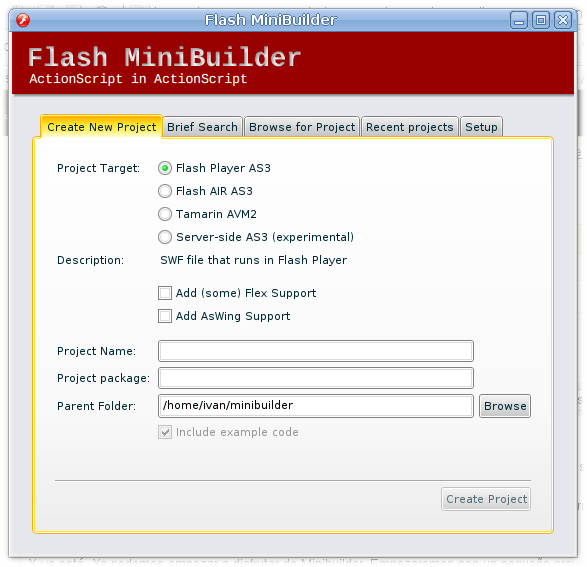
Minibuilder
Elegimos:
Project target : “Flash Player AS3”
Vemos que soporta dos frameworks : Flex y AsWing. Nosotros por ahora sólo usaremos Flex.
Activamos “Add (some) Flex support”
Como project name lo que queramos, en mi caso “hola mundo”.
Ese texto inicial que veremos se trata de MXML, un lenguaje de marcado que facilita el uso del framework Flex.
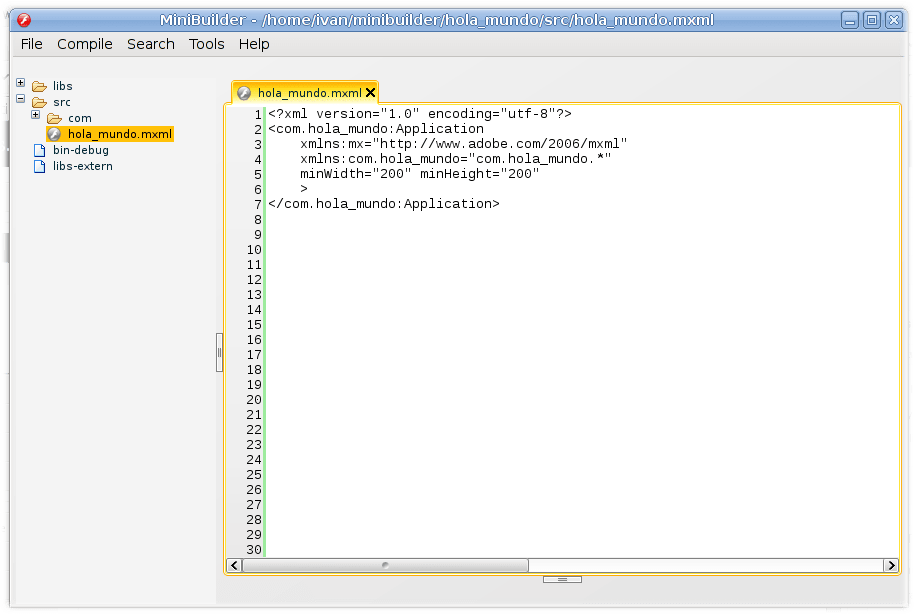
Editor Minibuilder
Hacemos click en “Compile and Quickrun”. Veremos que tarda su tiempo en compilar el SWF, años luz de la rapidez de MTASC o Haxe.
No veremos nada cuando no debería ser así. Sospecho que puede ser porque mi distribución Linux utiliza SWFDEC por defecto en lugar del player de flash Adobe. El swf lo podemos encontrar en la carpeta bin-debug, con lo cual podremos ejecutarlo manualmente.
Veremos que aparecen unos botones (“AAA”,”BBB”…) es debido a que se está utilizando la clase “Application.as” predefinida por Minibuilder que incluye esos botones en tabs.
Ahora ya es cuestión de aprender Flex. Como pistas para alguien que venga de MTASC decir que las clases Flash que se solían utilizar anteriormente, en la documentación están en el API de Flash Player.
Así que para jugar por un lado tenemos los controles del framework Flex: http://livedocs.adobe.com/flex/3/html/help.html?content=controls_01.html y por otro lado tenemos el API de Flash Player, el cual ya nos resultará familiar al haberlo utilizado con MTASC , Haxe o Flash Studio:
http://livedocs.adobe.com/flex/3/html/help.html?content=Part3_Flash_Player_APIs_1.html
Podemos utilizar ambas cosas sin problemas. En el siguiente ejemplo, se utiliza NetStream y Netconnection en lugar del control VideoDisplay de Flex, pero eso no quita para que los botones a utilizar puedan ser controles Flex:
Vemos que en ese ejemplo el código Actionscript se encuentra incrustado en el MXML. No tiene porqué ser así y de hecho yo no creo que sea una buena práctica. El ejemplo de Minibuilder utiliza una clase independiente para el código (Application.as). De todos modos, ya hablaremos en otro post sobre buenas prácticas, patrones y otras librerías.
Entonces como conclusión. ¿Qué ofrece Minibuilder en cuanto a facilitar el desarrollo para plataforma Flash?
Resaltado y autocompletado AS3, así como compilación amigable de SWF incluyendo gestión de los namespaces.
<?xml version="1.0" encoding="utf-8"?>
<!-- http://blog.flexexamples.com/2008/03/01/displaying-a-video-in-flex-using-the-netconnection-netstream-and-video-classes/ -->
<mx:Application xmlns:mx="http://www.adobe.com/2006/mxml"
        layout="vertical"
        verticalAlign="middle"
        backgroundColor="white"
        creationComplete="init();">

    <mx:Script>
        <![CDATA[
            import mx.utils.ObjectUtil;

            private var nc:NetConnection;
            private var ns:NetStream;
            private var video:Video;
            private var meta:Object;

            private function init():void {
                var nsClient:Object = {};
                nsClient.onMetaData = ns_onMetaData;
                nsClient.onCuePoint = ns_onCuePoint;

                nc = new NetConnection();
                nc.connect(null);

                ns = new NetStream(nc);
                ns.play("http://www.helpexamples.com/flash/video/cuepoints.flv");
                ns.client = nsClient;

                video = new Video();
                video.attachNetStream(ns);
                uic.addChild(video);
            }

            private function ns_onMetaData(item:Object):void {
                trace("meta");
                meta = item;
                // Resize Video object to same size as meta data.
                video.width = item.width;
                video.height = item.height;
                // Resize UIComponent to same size as Video object.
                uic.width = video.width;
                uic.height = video.height;
                panel.title = "framerate: " + item.framerate;
                panel.visible = true;
                trace(ObjectUtil.toString(item));
            }

            private function ns_onCuePoint(item:Object):void {
                trace("cue");
            }
        ]]>
    </mx:Script>

    <mx:Panel id="panel" visible="false">
        <mx:UIComponent id="uic" />
        <mx:ControlBar>
            <mx:Button label="Play/Pause" click="ns.togglePause();" />
            <mx:Button label="Rewind" click="ns.seek(0); ns.pause();" />
        </mx:ControlBar>
    </mx:Panel>

</mx:Application>
 ivanmosquera.net